Introducing the entity map: your site's structured data as one graph
Every squirrelscan audit now collapses your site's JSON-LD into one graph, so you can see whether you declare one organization or a new one on every page, and hand the fix to your coding agent.
 Nik Cubrilovic
Every page on your site describes itself twice: once in HTML for the people reading it, and once in structured data for the machines that index it. This post is about the second one, and about a mistake in it that no page-by-page check can see.
Structured data and entities, in a minute
Structured data is a block of JSON-LD in a page's HTML that says what the page is about, using a shared vocabulary from schema.org. The HTML says how the page looks. The JSON-LD says what it is: an article, written by this person, published by this company. Search engines and AI assistants read it to understand a page and who is behind it.
Each thing a block describes is an entity: your company, your website, an author, a product, a blog post. Here is a company declaring itself:
<script type="application/ld+json">
{
  "@context": "https://schema.org",
  "@type": "Organization",
  "@id": "https://northwind.example/#organization",
  "name": "Northwind Roasters",
  "url": "https://northwind.example/",
  "logo": "https://northwind.example/logo.png"
}
</script>
The @id is the entity's name tag. When an article on another page says its publisher is { "@id": "https://northwind.example/#organization" }, it points at that same company instead of describing a new one. That is how a site's pages add up to one identity: one company, one logo, one set of profiles, every article credited to it.
The problem with checking one page at a time
Structured data validators check one page at a time. That is the wrong unit for most of what goes wrong with structured data.
Put a valid Organization block on sixty pages and every one of them passes. If none of those blocks carries a shared @id, nothing in your markup says they are the same company. That is sixty valid declarations with nothing connecting them, and a green tick next to every one.
Every squirrelscan audit now builds an entity map to catch exactly that. It has been in the CLI since v0.0.96, it is on the dashboard, and your agent can read it over MCP.
What the entity map is
The map reads the JSON-LD on every crawled page, resolves the references between nodes, and collapses the result into one graph of the things your site actually declares: organizations, websites, people, products, articles, and the edges between them (publisher, author, isPartOf and the rest).
Collapsing is by @id when there is one, and by type and name when there is not. So sixty anonymous Organization blocks with the same name become one entity declared on sixty pages, and the map flags it for having no @id.
Every audit reports a handful of numbers about the map:
| Number | What it tells you |
|---|---|
| Entities | Distinct things the site declares, after collapsing duplicates |
| References | Typed edges between them |
Stable @id share | How many entities carry an identifier, and so can accumulate across pages. Watch this one |
| Dangling references | Edges pointing at an @id that no crawled page declares |
| Conflicts | The same entity with two logos, two phone numbers or two names |
The map itself never changes your health score. It describes what your site declares. What is wrong with it is reported by 13 new audit rules, further down.
An example: northwind.example
Here is the map for northwind.example, a coffee roaster we made up for the docs (the coffee is made up too, sadly). It is real engine output: a 12-page site audited with the CLI, drawn with the dashboard's own Entities components.
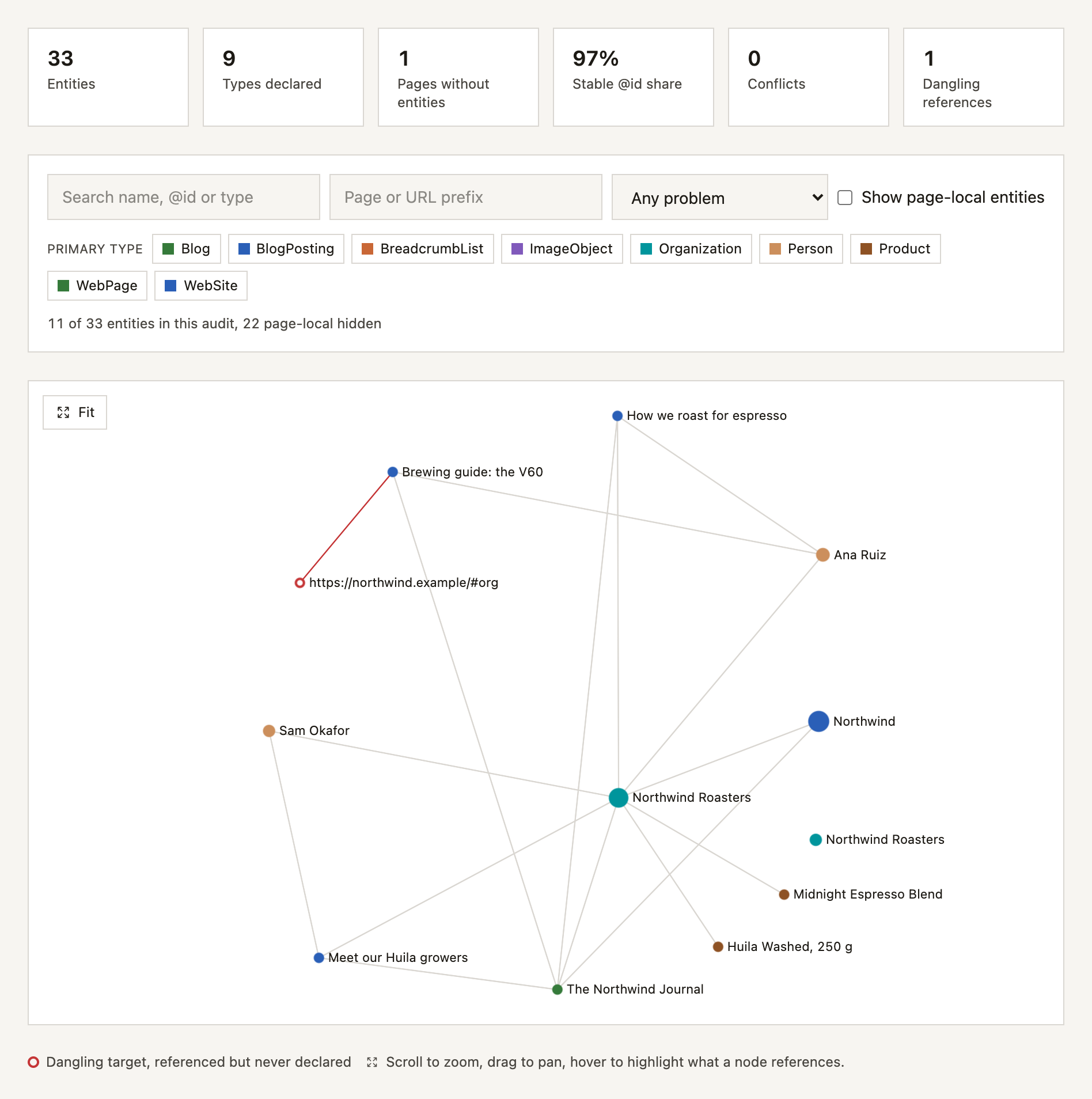
Three things stand out once it is one picture:
- One organization holds the site together. The website, the journal, both authors, both products and two of the three articles reference
https://northwind.example/#organizationby its@id. - There is a second Northwind Roasters with no lines to anything. Someone pasted an
Organizationblock into/contact/and/wholesale/without an@id, so as far as the markup is concerned it is a different company. - The red ring is a reference to nothing. The V60 brewing guide names its publisher as
https://northwind.example/#org, and no page declares that.
The duplicate is invisible one page at a time: the pasted block is valid on its own page. A per-page check can see that the V60 article's publisher has no name, but not that no page anywhere on the site declares #org. Taken as a whole, the site has two identities and a broken reference.
Monitor it, fix it with your agent
Identity is not something you fix once. A new template, a plugin update or one pasted block declares the organization again, and the map drifts back. Every audit rebuilds the map, so squirrel entities --diff and the dashboard's history show you when it happens.
The fix itself is mechanical but spread across templates, which is exactly the kind of job to hand to a coding agent. Here is the loop on a local copy of northwind.example, served at http://localhost:4321. The prompt:
Audit http://localhost:4321 with squirrelscan and fix the organization
that is declared without an @id. Then re-audit and show me the entity diff.
The audit reports the pasted block on both pages:
schema/entity-identity Entity Identity (error)
  ✗ entity-identity: 1 entity is declared on several pages with no @id
    → Northwind Roasters (Organization)
      from /contact/
      from /wholesale/
The fix is one line in that block, on both pages:
 {
   "@context": "https://schema.org",
   "@type": "Organization",
+  "@id": "https://northwind.example/#organization",
   "name": "Northwind Roasters",
Then squirrel audit http://localhost:4321 --refresh and squirrel entities --diff, trimmed to the parts that matter:
## Removed (1)

| Type | Name | @id | Occurrences |
| --- | --- | --- | ---: |
| Organization | Northwind Roasters | _none_ | 2 |

## Occurrence changes (1)

| Type | Name | Before | After | Change |
| --- | --- | ---: | ---: | ---: |
| Organization | Northwind Roasters | 9 | 11 | +2 |

## Summary changes (3)

| Metric | Before | After | Change |
| --- | ---: | ---: | ---: |
| nodeCount | 33 | 32 | -1 |
| nodesWithoutIdCount | 1 | 0 | -1 |
| stableIdShare | 0.970 | 1 | +0.03 |
The anonymous copy is gone, and the diff says both pages that carried it were crawled again, so it is a real removal rather than a page the second audit skipped. The organization is now declared on 11 pages instead of 9, the stable @id share is 100%, and schema/entity-identity no longer fires.
The dangling #org publisher is still there. That is the next prompt.
The "were those pages crawled again" check is the part that is easy to get wrong by hand. A smaller second crawl can make an entity look removed when the audit simply never went back to the page, and the diff reports those separately, as not crawled again, rather than calling them fixed.
Where you see it
In every report. The terminal report has an Entities block above the issues. The HTML report draws the map as a graph you can pan, zoom and filter, Markdown gives you tables, and JSON carries the whole document under an entities key.
In the CLI. squirrel entities queries the stored map without crawling again:
squirrel entities                         # the most-declared entities and anything to fix
squirrel entities --problem no-id         # entities on several pages with no @id
squirrel entities "Northwind Roasters"    # one entity, by @id, key or name
squirrel entities --diff                  # what changed since the last audit
squirrel entities -f jsonld -o graph.json # export: also csv, dot, graphml, mermaid
On the dashboard. Every website has an Entities page with the graph, six summary cards (with the change against the previous audit, where there is one to compare), filters, and a table. Below it, a history view plots those numbers across the site's audits and lists the tracked changes between two of them.
For your agent. Five MCP tools read the map: list_entities, get_entity, get_entity_graph, compare_entities and get_entity_findings. They are on the local squirrel mcp server, with no account needed, and on the hosted server. They read audits that already exist: none of them changes your site or runs an audit.
The 13 rules
Thirteen site-wide schema/entity-* rules read the map and report what is wrong with it. They are listed with the rest of the structured data rules in the docs, and each one below links to its own page:
| Rule | Finds |
|---|---|
entity-identity | The same organization, person or website on many pages with no @id |
entity-split-identity | The same entity declared under two @ids on one page, usually by two plugins |
entity-dangling | A reference to an @id nothing declares |
entity-id-format | An @id that is not a stable identifier, such as a bare word or a blank node |
entity-conflicts | Two logos, names or phone numbers for one entity |
entity-type-drift | One @id with different types on different pages |
entity-publisher-mismatch | Pages that name different publishers |
entity-authors | Articles with no author entity of any kind, or author Person entities with no url and no sameAs |
entity-organization-missing | A business with no organization entity |
entity-website-missing | No WebSite node, or no isPartOf links to it |
entity-sameas-missing | Your main organization has no sameAs profiles |
entity-local-business-per-page | A LocalBusiness declared in full on 80% or more of crawled pages, on crawls of five pages or more |
entity-orphan | An @id that nothing references, declared on one page only, not counting a page's own subject such as its article or product |
Unlike the map, these rules do count towards your score. Every finding links to fixing structured data identity, which has the change to make in Yoast, Rank Math, WordLift, Next.js, Astro and tangly. Most of them come down to one idea: give each entity one absolute @id, identical on every page, and reference it everywhere else.
Try it on your site
squirrel audit https://your-site.com
squirrel entities
Already have squirrel? squirrel self update gets you the latest version. New here? curl -fsSL https://install.squirrelscan.com | bash, then squirrel setup.
It is in the cloud and over MCP too:
- In the cloud: every cloud audit builds the same map. Open a website in the dashboard and its Entities page shows the graph, with a history across audits. More in the entity map in the cloud.
- Over MCP: the five entity tools are on
squirrel mcpfor local audits and on the hosted server atmcp.squirrelscan.comfor cloud ones, so your agent can read the map and make the fix itself. More in the entity map for agents.
The full guide, with the format reference, the dashboard and API, and the agent loop in more depth, is at docs.squirrelscan.com/guides/entity-map.