squirrelscan for agencies
Audit client sites end to end, hand the fixes to your coding agent, and send the report with your logo on it.
Audit every client site properly
A Team audit crawls up to 10,000 pages and renders 10 at once, against 300+ rules in 22 categories. Staging behind a login works too: send custom request headers with the audit.
The same rule set runs from the website audit tool, the dashboard, the API and the squirrel CLI. A signed-out CLI audit skips the few rules that need the cloud.
Keep watching after handover
Schedule an audit for every client site, as often as daily. When a scheduled audit finds a link that broke since the one before, the site's alert address gets an email.
Fix it with your coding agent
Every issue in a report has a Copy fix prompt button, and the CLI prints a compact report written for a model. Hand it to Claude Code, Cursor or Codex and audit again when it is done. There is more on that loop in fixing audit issues with AI.
Your logo on the report
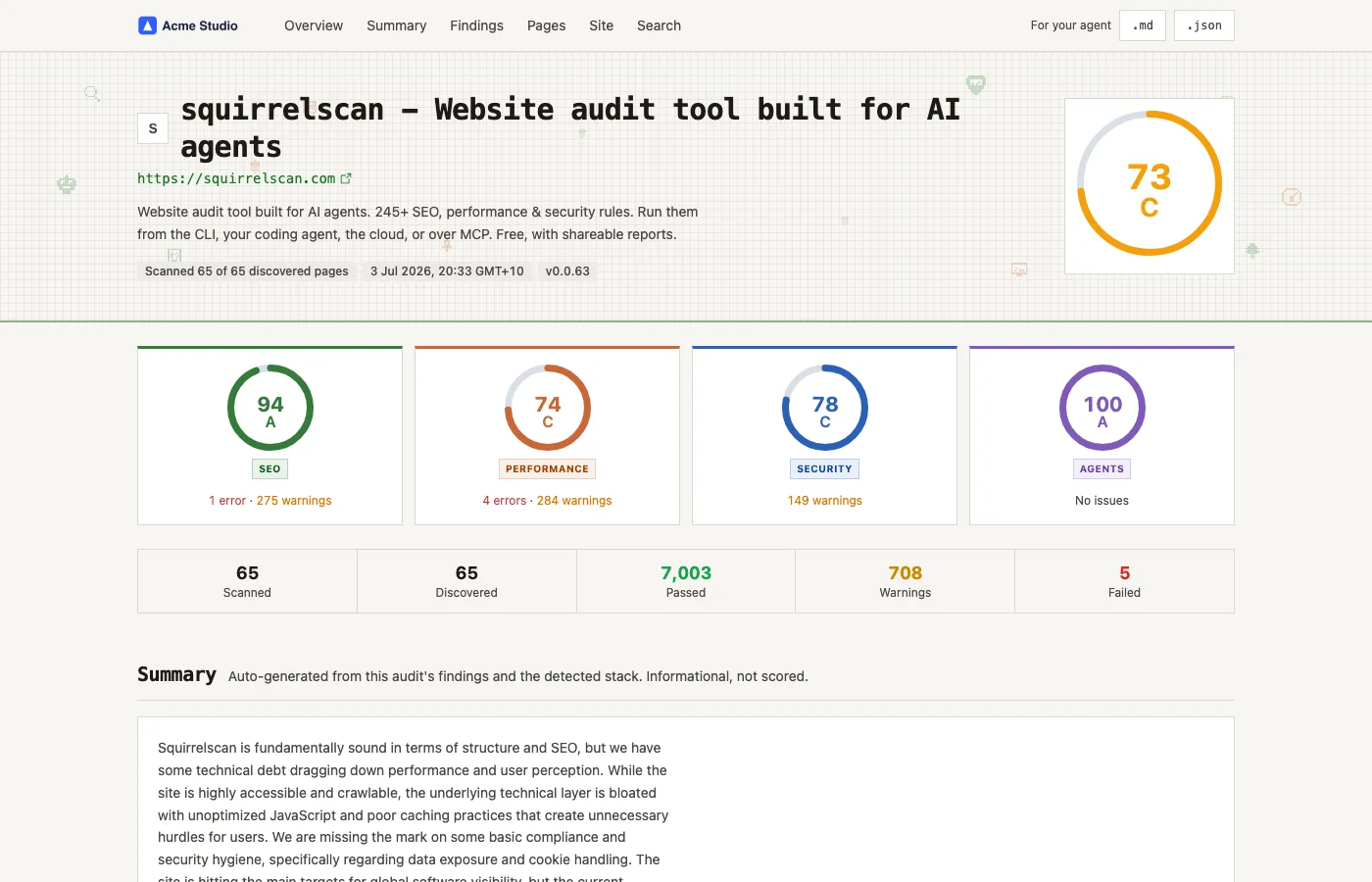
Reports from a Team org are white-labelled. Here is what changes:
- Published report pages show your organization's logo in the header, or its name when there is no logo.
- The 'Generated by squirrelscan' footer, the squirrelscan header link and the squirrelscan cloud upsell are gone.
- The markdown version drops the squirrelscan header and credit, and so do CLI exports (HTML, Markdown, text, XML) when the CLI is signed in to the Team org and not run with --offline. Signed-in audits spend credits.
- A shared link names your organization as the site in its preview card.
What white-label does not cover yet
- Your colors or theme. Reports keep squirrelscan's design.
- A custom domain. Report links stay on reports.squirrelscan.com, and so do the .md links inside agent prompts.
- The link preview image. Paste a report link into Slack, email or social and the image still shows squirrelscan.
- PDF export. Send the link, or export HTML or Markdown from the CLI.
- Client logins without a seat. A client who needs the dashboard joins your org as a member, and every member is a paid seat, viewers included.
- Per-client branding. One logo per org, on every report.
- Fix prompts. The Copy fix prompt text still says the finding comes from a squirrelscan audit.
- Reports from before you upgraded or changed your logo. A cached report page can keep its old branding until it is published again.
Need one of these? Tell us. It is how we decide what to build next.
Credits for a client roster
Seats pool their credits into one balance for the whole org. Some numbers to plan with:
- A 25-page client site costs 50 + 2 × 25 = 100 credits per audit, before external link checks. One seat's 3,000 credits a month cover about 30 of those.
- A 100-page site costs 250 credits before link checks. With the minimum 2 seats (6,000 credits a month, pooled) that is 24 audits a month, enough to re-audit 5 clients weekly.
- A daily audit of one 25-page site uses 100 × 30 = 3,000 credits a month, a whole seat's allowance. Daily scheduling is cheap to switch on and expensive to leave on, so most client sites want weekly.
- External link checks, on by default, add 1 credit per distinct external link the cloud verifies, capped at one credit per page of the audit's page limit. Links it cannot verify cost nothing.
- The 10,000-page ceiling is there for big sites, not as a default: a full 10,000-page audit costs 20,050 credits before link checks. Set a page limit for each audit.
Team or the free options
| Feature | Free account | CLI, signed out | Team |
|---|---|---|---|
| Cost | $0 | $0 | $29 per seat a month, minimum 2 |
| Cloud credits | 500 a month | None needed: audits run on your machine | 3,000 per seat a month, pooled |
| Pages per cloud audit | Up to 500 | No cloud audits | Up to 10,000 |
| People | 1 | Whoever runs it | Invites and roles |
| Scheduled audits | Weekly, 1 site | Your own cron or CI | Daily, all sites |
| Broken link alerts | No | No | Yes |
| Report branding | squirrelscan | squirrelscan | Your logo or name |
If you only need to run audits, the CLI is free while you are signed out. Team is for sharing one credit pool across your people, watching client sites on a schedule, and sending reports under your own name. Full details are on the pricing page and in the credits docs.
Frequently asked questions
- What does white-label change on a report?
- Your logo, or your organization's name, replaces squirrelscan in the report header, and the 'Generated by squirrelscan' credit and the squirrelscan upsell are removed from report pages, the markdown version and signed-in CLI exports. Copied fix prompts still mention squirrelscan.
- Can I use my own colors or domain?
- Not today. Reports use squirrelscan's design and live at reports.squirrelscan.com.
- Can I export a PDF?
- Not today. Send the report link, or export HTML or Markdown from the squirrel CLI.
- Can my clients log in?
- Only as members of your org, and each member is a paid seat, whatever the role. Most agencies send a report link instead. An unlisted report opens for anyone with the link, no account needed.
- How are seats billed?
- Per accepted member, never below 2 seats, prorated when someone joins or leaves mid-cycle. A seat added mid-cycle brings its credits with the next invoice. Invites cost nothing until they are accepted. A seat is $29 a month, or $290 a year.
- Do unused credits roll over?
- No. Monthly plan credits reset each billing period, and the pool refills with your seat count.
- Can we audit staging sites behind a login?
- Yes. Send custom request headers with the audit, such as an auth token, on any plan.
- Is there an enterprise plan?
- Talk to us. Enterprise is arranged case by case: tell us what you need through the form at squirrelscan.com/feedback.
Try it on one client first
Run the CLI on a client site for free while signed out. When the report is worth sending, move to Team: $29 per seat a month, at least 2 seats.