Website audit tool
Crawl your whole site, run 300+ audit rules on every page and get a report your coding agent can work through. In the cloud or from the CLI.
Want to see a real report first? See a sample report.
What you get
A report like this one, from squirrelscan auditing its own site: a score per category, an editor's summary of what to fix first, then every issue with the pages it affects and a prompt you can paste into your coding agent.
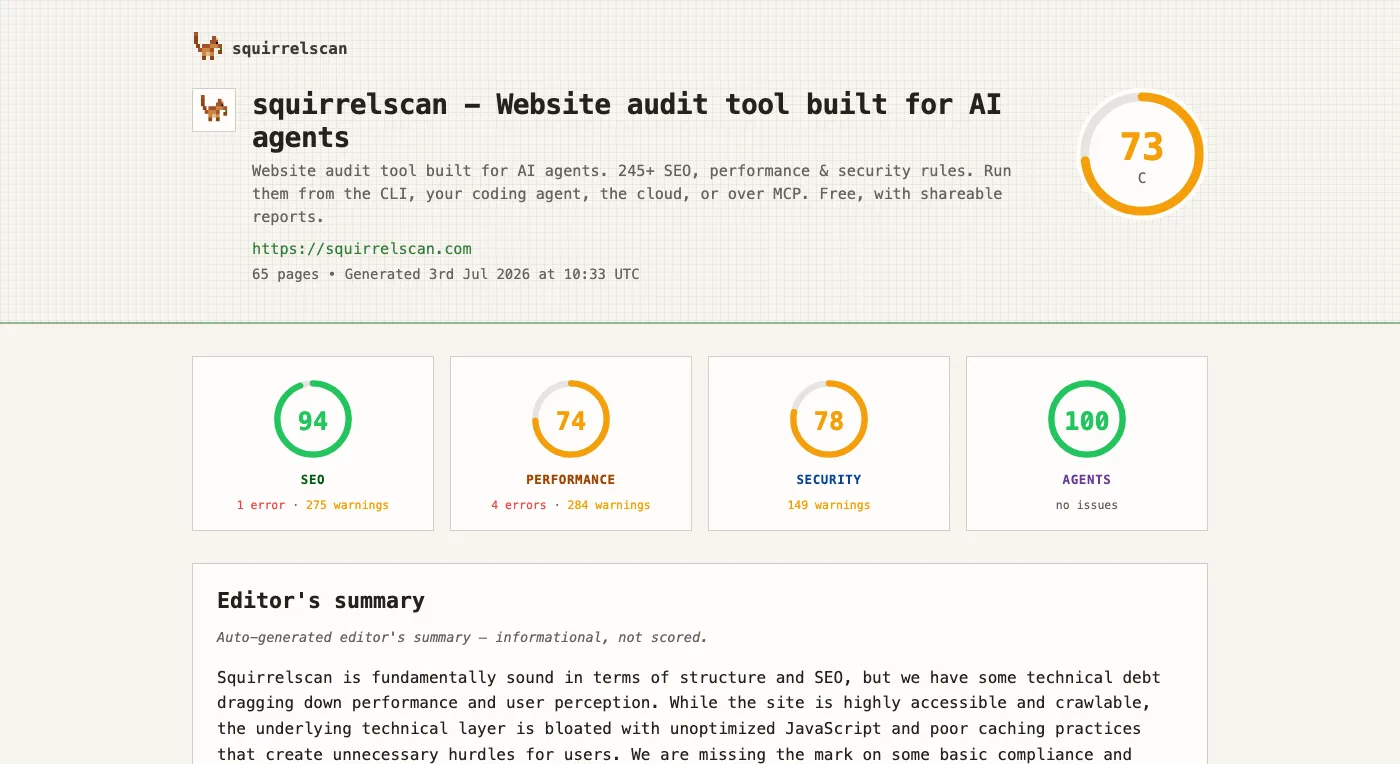
Open the demo report to click through the issues.
What an audit covers
300+ rules across 22 categories. Each category links to its rules in the docs, with what every rule checks and how to fix it.
- Accessibility61 rules
- Ad blocker filters3 rules
- Agent experience17 rules
- Analytics2 rules
- Content24 rules
- Core SEO14 rules
- Crawl20 rules
- E-E-A-T15 rules
- Internationalisation2 rules
- Images15 rules
- Site integrity9 rules
- Legal4 rules
- Links16 rules
- Local SEO3 rules
- Mobile8 rules
- Performance30 rules
- Reliability2 rules
- Structured data25 rules
- Security22 rules
- Social5 rules
- URL structure9 rules
- Video3 rules
How it works
- 1
Enter your URL
Type your site's address. It opens the squirrelscan dashboard to start a cloud audit (signing up is free), which crawls your pages the way a search engine does.
- 2
It runs 300+ rules
Every page is checked against the rule set across 22 categories, then scored into a report.
- 3
You get the fixes
Each issue lists the pages it affects and what to change, in a form you can hand straight to a coding agent.
Cloud or CLI: which one when
Both run the same rule set, except that a signed-out CLI audit skips the few rules that need the cloud. The cloud is for audits you want hosted, scheduled and shared. The CLI is for audits on your own machine, in CI, or inside a coding agent.
| Feature | Cloud audit | squirrel CLI |
|---|---|---|
| Where it runs | On squirrelscan's servers, started from the dashboard, the API or MCP | On your machine or a CI runner |
| Cost | Credits: 50 per audit plus 2 per page, and 1 per verified external link, with 500 free a month | Free signed out or with --offline. Signed in, the same credits as the cloud |
| Pages per audit | Up to 500 on Free, 2,000 on Pro, 10,000 on Team | Set with --max-pages |
| JavaScript rendering | Pages that need JavaScript load in a cloud browser (every page at Surface and Full level) | Rendered in the cloud when signed in; plain HTTP signed out |
| Scheduling | Weekly for one site on Free, daily for every site on Pro and Team | Run it from cron or your CI |
| CI gate | Not applicable (use the CLI in the pipeline) | --fail-on exits with code 2 when a threshold trips |
| Coding agents | Published report links and an MCP server | --format llm output and the squirrelscan agent skill |
How to fix what it finds
Hand the report to your coding agent. From the CLI, squirrel audit --format llm prints a compact report written for a model, and the squirrelscan skill runs the audit, fix and re-audit loop for you in Claude Code, Cursor and other agents.
Say the audit reports links/broken-links with https://example.com/old-pricing (404), linked from twelve pages. Twelve pages usually means one component, often the footer. The agent finds the link there, points it at the new URL, and the next audit confirms it is gone. More worked examples are in fixing audit issues with AI.
Only need one check?
Check your /llms.txt against the llmstxt.org spec, live.
robots.txt generatorBlock AI training bots while keeping AI search and live fetches, from a curated crawler list.
AI crawler checkerSee which AI crawlers your robots.txt and your firewall let in, grouped by what each bot is for.
Broken link checkerFind dead internal and external links across every crawled page.
Core Web Vitals checkerFind the likely causes of slow LCP, INP, and CLS on every page, with a fix for each.
Security headers checkerCheck a page's CSP, HSTS and other security headers instantly, with a fix for each gap.
Coming from a desktop crawler? See how squirrelscan compares as a Screaming Frog alternative and a Lighthouse alternative, or check the pricing.
Frequently asked questions
- What does a website audit check?
- squirrelscan runs 300+ rules across 22 categories, from crawlability, links and structured data to performance, security, accessibility and agent experience. It crawls your whole site, not one page, and reports each issue with the pages it affects and a fix.
- Is it free?
- The llms.txt validator, the AI crawler checker, the robots.txt generator and the instant security headers check are free and need no account. The other checks run inside a squirrelscan audit. The squirrel CLI runs audits on your machine for free when you are signed out or pass --offline, with no cap on how many. Signed in, CLI and cloud audits spend credits: every account gets 500 free credits a month. An audit costs 50 credits plus 2 per audited page, and 1 per external link the cloud verifies when link checks are on.
- How many pages can it crawl?
- A cloud audit's page ceiling is 500 on the Free plan, 2,000 on Pro and 10,000 on Team. Credits set the practical limit: at 50 credits per audit plus 2 per page, a 100-page audit costs 250 credits, plus 1 per external link the cloud verifies when link checks are on.
- Does it render JavaScript?
- Yes, when you are signed in. Audits then render in a headless browser in the cloud: at the Quick level only the pages that need JavaScript, at Surface and Full every page. Rendering costs nothing beyond the normal page price. Signed-out and --offline CLI audits fetch plain HTML.
- How long does an audit take?
- A typical audit finishes in a few minutes. Larger sites take longer because there are more pages to crawl and score. You can watch progress live from the dashboard.
- Can I run the audit from the command line or in CI?
- Yes. The squirrel CLI runs the same rules locally and on a build machine. Install it with curl -fsSL https://install.squirrelscan.com | bash, then run squirrel audit https://example.com. Pass --fail-on to gate a build, for example --fail-on 'severity>=error', and the command exits with code 2 when the condition trips.
Ready to audit?
In the cloud
squirrelscan crawls the site for you and keeps each report in your dashboard. Every account gets 500 free credits a month. An audit costs 50 credits plus 2 per audited page, and 1 per external link the cloud verifies.
On your machine
The squirrel CLI runs the same rules locally, free while you are signed out or with --offline. Install it, then run:
squirrel audit https://example.com