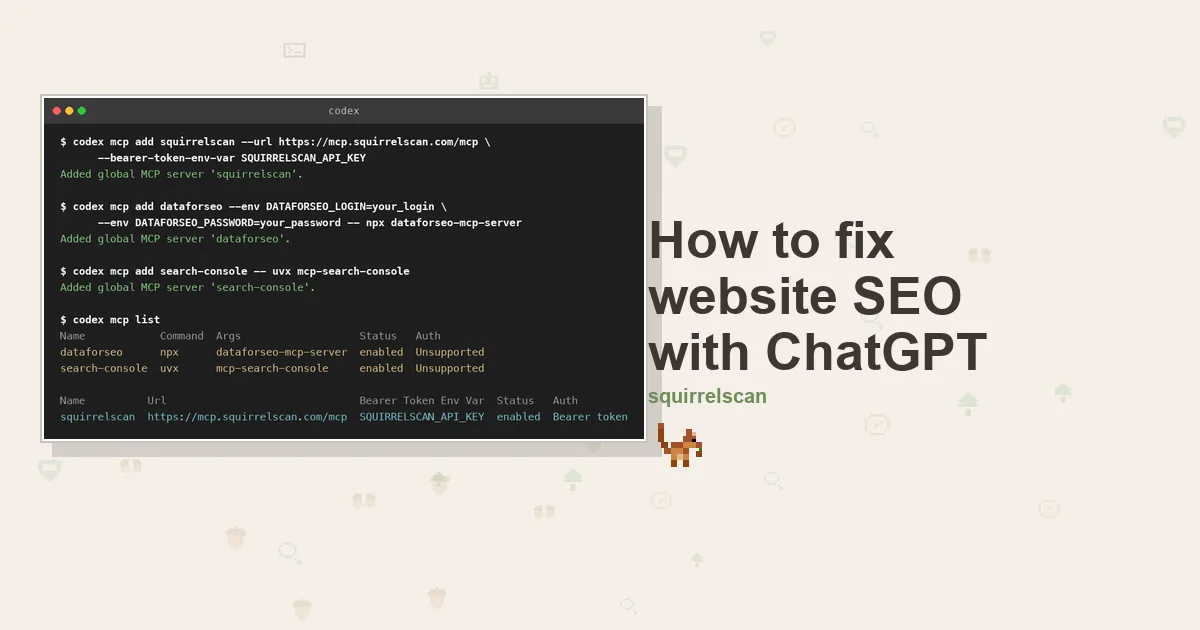
Codex already had the Nut House repository open. That is the frustrating part of this story. The shop sells roasted almonds, cashews and a walnut selection box that carries December on its own, out of a Next.js App Router build of about forty pages. The agent could read every route, every component and every line of generateMetadata in it, and still could not tell me why the almond category had drifted from position 4 to position 9 over two months, with an impressions chart ugly enough that my first theory was a broken analytics tag.
It could not tell me because none of the evidence lives in the repository. Whether a page has a canonical is in the rendered HTML. Whether anyone searches for the phrase it targets is in a keyword API. What Google already ranks it for is in Search Console. An agent with only the source tree in front of it is guessing, confidently, from one of four things it needs.
So the job was never to make Codex smarter. It was to hand it the other three, which is what MCP servers are for.
What the thing is actually called
Worth two paragraphs, because the naming has drifted and the drift trips people up.
The agent is still called Codex. The terminal tool is Codex CLI, written in Rust, and its README opens by calling it "a coding agent from OpenAI that runs locally on your computer". The desktop app opens with codex app. The cloud agent is Codex Web. There is an IDE extension for VS Code, Cursor and Windsurf, and a codex exec mode for scripts and CI.
What moved is everything around the agent. The documentation now lives on learn.chatgpt.com and developers.openai.com, and the old developers.openai.com/codex/changelog address redirects to learn.chatgpt.com/docs/changelog. The installer is served from chatgpt.com. You sign in with a ChatGPT account, on a ChatGPT plan. So when someone says they are doing this in ChatGPT and someone else says Codex, they are usually describing the same terminal window. Install:
curl -fsSL https://chatgpt.com/codex/install.sh | sh
# or
npm install -g @openai/codex
# or
brew install --cask codex
Then codex login for the browser flow, printenv OPENAI_API_KEY | codex login --with-api-key if you would rather pay per token, or codex login --device-auth on a headless box. codex login status reports which one is active, which is the thing you want in a CI script.
If you want the background on what MCP is, and why an agent calling a tool beats you pasting a report into a chat window, the SEO MCP server guide covers it and this page will not repeat it. The protocol spec is the reference if you want the wire format. If you landed here wanting to be cited by ChatGPT rather than to use it, that is a different job and it has its own page.
Where Codex keeps MCP servers
Configuration lives at ~/.codex/config.toml, and it is TOML, not JSON. That trips people arriving from the mcpServers JSON block that most other clients use. There is also a project-level .codex/config.toml, but it is only read once you have marked the project as trusted, which is a deliberate guard against a repository shipping its own agent config.
An MCP server is a table under mcp_servers. Useful per-server keys: enabled = false parks a server without deleting it, startup_timeout_sec and tool_timeout_sec bound the two ways a server can hang, and enabled_tools and disabled_tools trim a chatty server's surface before it eats your context window. For remote servers there is bearer_token_env_var for a static token, plus http_headers and env_http_headers for fixed and environment-sourced headers.
Two keys that look like duplicates and are not. env is a map of variables to set for the server process. env_vars is a list of variables to allow through from your own environment. A secret in env is written into the file; a secret named in env_vars is not.
codex mcp add
codex mcp add writes those blocks for you, and its help states the shape as codex mcp add [OPTIONS] <NAME> (--url <URL> | -- <COMMAND>...):
codex mcp add <name> -- <command> [args...]      # stdio
codex mcp add <name> --url <endpoint>            # streamable HTTP
One of the two is required and they are mutually exclusive. The -- separator tells the parser where your command's own arguments start, so codex mcp add search-console -- uvx mcp-search-console works and dropping the dashes does not. --env KEY=VALUE is repeatable and only valid on the stdio form.
The scope surprise: it only ever writes to the global config. Run it and the confirmation reads Added global MCP server 'squirrelscan'. There is no flag to target a project. For a server scoped to one repository, hand-write the block into that repository's .codex/config.toml and trust the project.
Authenticating a remote server
For a static token, hand --bearer-token-env-var the name of an environment variable, never the value:
codex mcp add squirrelscan --url https://mcp.squirrelscan.com/mcp \
  --bearer-token-env-var SQUIRRELSCAN_API_KEY
That writes bearer_token_env_var = "SQUIRRELSCAN_API_KEY", and Codex reads the variable at connect time and sends its value as an Authorization bearer header. The CLI help marks the flag as valid only with streamable HTTP servers. This is the right mode for CI, for containers, and for any config file you might commit.
For a server that speaks OAuth, skip the token entirely:
codex mcp login squirrelscanThat runs the authorization code flow and stores the result outside config.toml. codex mcp add also carries --oauth-client-id and --oauth-client-registration, which takes auto, cimd or dcr, so there is usually no client id to create by hand. codex mcp logout clears it again.
How to check which MCP servers are enabled in Codex
Two commands answer two genuinely different questions, and conflating them is how people end up debugging a server that was never running.
codex mcp list reads your config and prints what is configured, as two tables. Here is the real output for the stack in this guide:
Name            Command  Args                   Env                                                Cwd  Status   Auth
dataforseo      npx      dataforseo-mcp-server  DATAFORSEO_LOGIN=*****, DATAFORSEO_PASSWORD=*****  -    enabled  Unsupported
search-console  uvx      mcp-search-console     GSC_CREDENTIALS_PATH=*****                         -    enabled  Unsupported

Name          Url                               Bearer Token Env Var  Status   Auth
squirrelscan  https://mcp.squirrelscan.com/mcp  SQUIRRELSCAN_API_KEY  enabled  Bearer token
Note that it masks environment values, so the output is safe to paste into an issue. --json gives you the same thing machine-readably. The Status column is derived from the config alone: it says enabled or disabled, not working.
/mcp, typed inside a running session, shows what actually connected and which tools came back. That is where a bad key or an unreachable endpoint shows up. There is also codex doctor, which diagnoses installation, config, auth and runtime health, though it is not MCP-specific.
One more naming trap while we are here. codex mcp manages external servers that Codex connects to as a client. codex mcp-server starts Codex itself as a server over stdio, so another agent can drive it. Opposite directions, similar names. This guide is entirely the first one.
Server one: squirrelscan, for what is actually broken
This is the one that finds the Nut House's problems. squirrelscan runs a hosted MCP server over streamable HTTP, so it goes in with the --url form above, authenticated either by OAuth or by an API key you mint with squirrel keys create --shell.
The tool surface is twenty tools, but the working loop is three: run_audit starts a crawl, get_audit_status polls it, get_report returns the finished thing as summary JSON, compact text built for a model, or full markdown. Around that core, list_issues and get_issue drive a per-website tracker that survives across runs, comment_on_issue lets the agent record what it changed, compare_audits diffs two runs, and list_rules and get_rule let it look up why a check failed rather than guess. Call whoami first: it reports which organization your credentials act for and what the credit balance is.
Behind those tools sit 300+ audit rules across 21 categories: crawlability, core SEO, content, structured data, images, performance, security headers, the machine-checkable slice of accessibility, and agent experience, which asks whether AI crawlers can read the page at all. Full setup detail is in the hosted MCP docs.
None of this requires the cloud at all. The squirrel CLI is MIT licensed, and signed out or with --offline it is free and needs no account:
curl -fsSL https://install.squirrelscan.com | bash
squirrel audit https://thenuthouse.example --offline --format llm
Reach for --format llm when an agent is the reader: it trades the pretty console output for something compact and structured. Codex can shell out to it any time you would rather not spend credits, and because it is an ordinary command it survives into codex exec runs in CI.
Server two: DataForSEO, and a version trap
Keyword volume, cost per click and difficulty come from DataForSEO, which publishes an official server. It is stdio, so it goes in with the -- form:
codex mcp add dataforseo \
  --env DATAFORSEO_LOGIN=your_login \
  --env DATAFORSEO_PASSWORD=your_password \
  -- npx dataforseo-mcp-server
The trap is that DataForSEO rewrote this server and kept the npm package name. Version 3.0.0 landed on 11 August 2026 and replaced roughly forty typed per-API tools with four generic ones: docs_index, docs_list_sections, docs_search and api_request. The model now browses DataForSEO's own documentation, finds the endpoint it wants, and calls it through api_request. It never goes stale against new endpoints, but expect an extra round trip while the model reads the docs. The current release is 3.1.1.
Any guide telling you to set ENABLED_MODULES is describing version 2, which now lives in a separate deprecated repository. That variable does nothing on version 3. DATAFORSEO_USERNAME is accepted as an alias for the login variable, and there is a hosted endpoint at https://mcp.dataforseo.com/v3/mcp if you would rather not run a local process.
This is the only part of the stack with a hard floor. DataForSEO is pay as you go with no subscription and a $50 minimum payment, and related-keyword lookups run around $0.024 per hundred. Registration comes with a $1 trial credit, which is enough to decide whether you want it.
Server three: Search Console, with no official option
Google has not shipped an official Search Console MCP server, and its own list of supported servers covers Drive, Gmail, Calendar, Maps and a long tail of Cloud services without mentioning Search Console. So everything offering Search Console data as MCP tools is a community wrapper around the public API, and you should pick one with your eyes open and read the commit history first.
I went with AminForou/mcp-gsc, which is the most adopted of them at around 1,500 stars and was last touched on 15 September 2026. It runs under uvx:
codex mcp add search-console \
  --env GSC_CREDENTIALS_PATH=/Users/you/.config/gsc-service-account.json \
  --env GSC_SKIP_OAUTH=true \
  -- uvx mcp-search-console
GSC_SKIP_OAUTH=true is what tells it to authenticate as the service account instead of opening a browser, which is the mode you want on a server or in CI.
Credential setup is the tedious part and it is the same wherever you land. Enable the Search Console API in a Google Cloud project, create a service account and download its JSON key, then add that account's .iam.gserviceaccount.com address under Settings, Users and permissions in Search Console. Full access is enough to read performance data and inspect URLs.
If you want a tighter guard than this server offers, disabled_tools on the Codex side will hide anything you would rather the agent could not call. If you outgrow the API's row limits entirely, Search Console's BigQuery bulk export is the escape hatch.
The loop, on one almond page
Back to that drifting category page. With all three servers in one config file, Codex stops needing you as a courier between four browser tabs.
Start with the audit. "Audit thenuthouse.example with squirrelscan and show me the worst pages." Codex fires run_audit, waits on get_audit_status, then pulls the finished report. Thirty-eight pages, health score 61. The almond section accounted for three of the findings on its own: twelve variant URLs under /nuts/roasted-almonds all rendering one title, not a canonical among them, and a /nuts/almonds category description of roughly forty words.
Decide what deserves the afternoon. An audit on its own will happily send you to fix a page nobody visits, because a red row looks the same whatever its traffic. So follow the failing list with a second question about demand, and let the answer reorder the work.
Price the keyword. Codex queries DataForSEO, browsing its documentation to find the right endpoint, then returns volume, cost per click and difficulty for the target phrase. "roasted almonds bulk" had enough behind it to be worth an afternoon. The walnut selection box looked equally broken in the audit and turned out to have almost no demand, so it sank down the list.
Ask what Google already believes. Here is the question neither of the other two servers can answer: does this page already rank, and under what phrase? /nuts/roasted-almonds hovered near position 14, picking up impressions for "bulk roasted almonds 1kg", wording that existed neither in the title nor anywhere in the copy. The audit had proposed a different fix entirely.
Land the fix in the repository. Until recently this is where you switched windows. Codex does not have to, and in the App Router the three findings converge on one file. generateMetadata in app/nuts/[slug]/page.tsx takes alternates.canonical, which stops the variants competing, and a title template carrying the weight, which ends twelve pages sharing one string. A Product JSON-LD block with price and availability goes into the same route. The category copy gets rebuilt around the phrase Search Console handed over, ideally reviewed by somebody who has actually eaten the almonds.
Recheck the single page. Point run_audit at the URL you edited with max_pages: 1: 52 credits, roughly a minute, and an unambiguous answer about whether it worked. Follow with comment_on_issue so the tracker carries the reason, which stops mattering like bookkeeping and starts mattering a great deal once this is forty pages spread over a month.
What each piece costs
Most of this stack costs nothing. Codex comes with every ChatGPT plan, Free among them, where the limit is on volume rather than access, and an API key works too. Nothing is charged for a signed-out run of the local squirrel CLI. Google charges nothing for the Search Console API, so that data is free as well. On the squirrelscan side a cloud audit costs 50 credits with another 2 for each audited page, drawn against a monthly grant of 500, which put the thirty-eight-page crawl at 126 and the single-page recheck at 52, both covered. A run that fails terminally is refunded. Paid tiers are on the pricing page. Only DataForSEO asks for a card.
None of which makes the thing autonomous. Give the agent four data sources and a template to edit and it will do that well. Ask it whether bulk buyers are the customer worth building the next quarter around and you are on your own, as you should be. The difference is that the decision now happens with every relevant number visible at once, and the resulting fix ends up committed in generateMetadata instead of parked on a list you will get to eventually.
The squirrel, for the record, remains unimpressed by the category copy.
If you run a different agent, the Codex integration page carries the same config block, and there are equivalents for Claude Code, Cursor and OpenClaw.