The Nut House has been quietly losing ground since July. It is a Next.js shop of about forty pages selling almonds, cashews and a walnut box that only matters in December, and its strongest category page had drifted from the first page of results down to somewhere nobody clicks. The analytics were not broken. Something on the page was.
Diagnosing that normally means three browser tabs and a lot of typing numbers into a fourth window. The data all exists, and none of it is anywhere near the code that produced the problem.
Claude Code is an unusually good place to close that gap, because it starts from the opposite end. The repository is already open, the agent is already in the terminal, and the only thing missing is any idea of what the site looks like to a crawler.
Getting Claude Code running
Claude Code is Anthropic's coding agent. Most people meet it as a terminal program, but the same agent ships as a desktop app, a VS Code extension, a JetBrains plugin, and cloud sessions you launch from the browser. Install the terminal one with a script:
curl -fsSL https://claude.ai/install.sh | bashHomebrew has a cask, brew install --cask claude-code, and there is an npm package, @anthropic-ai/claude-code, which pulls the same native binary rather than running on your Node. Windows takes irm https://claude.ai/install.ps1 | iex in PowerShell. Native installs update themselves in the background; the package managers do not.
Then claude in a project directory, and a browser opens for login. Worth knowing before you plan around it: Claude Code requires a paid account, Pro, Max, Team, Enterprise or Console, or a cloud provider such as Bedrock. The free claude.ai plan does not include it.
One detail that matters for everything below. The terminal, the two IDE extensions and the desktop app all read the same settings files on your machine, so a rule you write once is a rule everywhere you work locally. Cloud sessions run somewhere else and read a narrower set, which is why the project-scoped file gets its own section further down.
Nothing here explains the protocol itself. The SEO MCP server roundup does that, and lists which servers exist for this kind of work, so treat it as the prerequisite and this page as the wiring.
Where Claude Code keeps MCP servers
Three scopes, two files, and the difference is who gets the server.
| Scope | Lives in | Who sees it |
|---|---|---|
local, the default | ~/.claude.json, under this project's entry | You, in this one project |
user | ~/.claude.json, top-level mcpServers | You, everywhere |
project | .mcp.json at the repository root | Anyone who clones the repository |
Scope is fixed when you add a server, so switching one means claude mcp remove followed by a fresh claude mcp add at the scope you wanted. The documentation is blunt about the paths people invent and Claude Code never reads, ~/.claude/mcp.json among them, which is the first thing to check when a server you are sure you added does not show up.
Adding one is a single command. The --transport flag is what separates a hosted endpoint from a local process, and it defaults to stdio:
claude mcp add --transport http <name> <url>      # hosted
claude mcp add <name> -- <command> [args...]      # local process
The -- matters on the second form. Everything after it is handed to your server untouched, which is how a server's own flags avoid being eaten by Claude Code's parser. Add -e KEY=value for environment variables on a stdio server, --header for a bearer token on a remote one, and --scope to override the default.
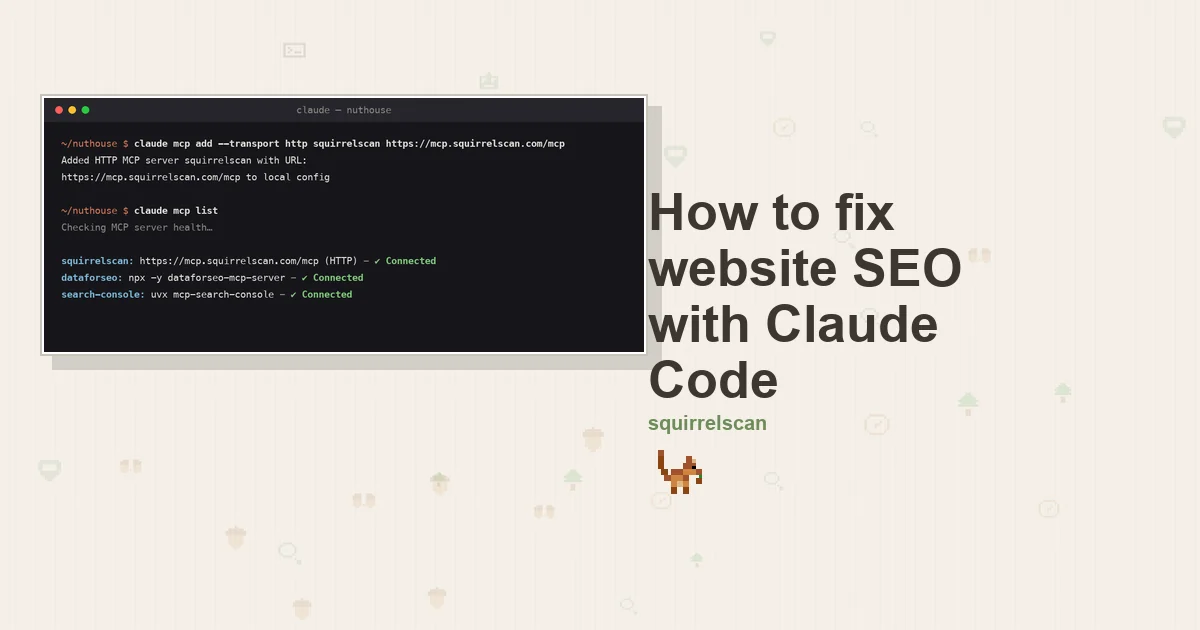
claude mcp list then health-checks everything and tells you what is actually up, which is a different question from what is configured:
squirrelscan: https://mcp.squirrelscan.com/mcp (HTTP) - ✔ Connected
dataforseo: npx -y dataforseo-mcp-server - ✔ Connected
search-console: uvx mcp-search-console - ✔ Connected
claude mcp get <name> drills into one server and reports which scope holds it. Inside a session, /mcp does the same job interactively and is also where OAuth sign-in happens.
The committed file
.mcp.json is the one worth writing by hand, because it is configuration as code: clone the repository, start Claude Code, approve the prompt, and your teammates have the same three tools you do. All three servers from this guide, in one file:
{
  "mcpServers": {
    "squirrelscan": {
      "type": "http",
      "url": "https://mcp.squirrelscan.com/mcp",
      "headers": {
        "Authorization": "Bearer ${SQUIRRELSCAN_API_KEY}"
      }
    },
    "dataforseo": {
      "type": "stdio",
      "command": "npx",
      "args": ["-y", "dataforseo-mcp-server"],
      "env": {
        "DATAFORSEO_LOGIN": "${DATAFORSEO_LOGIN}",
        "DATAFORSEO_PASSWORD": "${DATAFORSEO_PASSWORD}"
      }
    },
    "search-console": {
      "type": "stdio",
      "command": "uvx",
      "args": ["mcp-search-console"],
      "env": {
        "GSC_CREDENTIALS_PATH": "${HOME}/.config/gsc-service-account.json",
        "GSC_SKIP_OAUTH": "true"
      }
    }
  }
}
Those ${...} references are the reason this file is safe to commit. Claude Code expands ${VAR} and ${VAR:-default} inside command, args, env, url and headers, so the secrets stay in your shell and only their names reach git. A reference to something you have not set is left as literal text with a warning in claude mcp list, rather than silently becoming an empty string.
There is one deliberate hole in that, and it is a good one. In a remote server's url and headers, a small set of credential names reads as empty however you set them: Anthropic's own ANTHROPIC_API_KEY and ANTHROPIC_AUTH_TOKEN, cloud provider tokens, and general-purpose ones like NPM_TOKEN and HTTPS_PROXY. A :-default on them is ignored too. The point is that a .mcp.json in a repository you cloned cannot quietly forward your Anthropic credentials to a server it names. Anything outside that set, SQUIRRELSCAN_API_KEY included, expands exactly as written.
A project server does not connect until you approve it, once, the first time Claude Code sees it. If you dismissed that prompt and now cannot get it back, claude mcp reset-project-choices clears the decision.
Server one: squirrelscan, for what is broken
Keyword tools will never tell you that twelve URLs are competing for the same title. That is the audit half, and it goes in first.
The server squirrelscan hosts speaks streamable HTTP from its own infrastructure, which means nothing to install locally and nothing to keep alive:
claude mcp add --transport http squirrelscan https://mcp.squirrelscan.com/mcpClaude Code confirms with Added HTTP MCP server squirrelscan with URL: https://mcp.squirrelscan.com/mcp to local config and prints the file it wrote. Then open a session, type /mcp, choose squirrelscan, choose Authenticate, and sign in through the browser to pick the organization the agent acts for. On a machine with no browser, claude mcp login squirrelscan --no-browser prints the URL for you to open elsewhere and paste the redirect back. If you would rather use a static key, squirrel keys create --shell mints one and offers to write the export line into your shell startup file, keeping it out of anything you might commit, and --header "Authorization: Bearer $SQUIRRELSCAN_API_KEY" on the add command does the rest.
Twenty tools arrive. Three of them do the actual work: run_audit kicks off a crawl, get_audit_status polls until it finishes, and get_report hands back the result as summary JSON, as compact text shaped for a model, or as full markdown. run_audit accepts max_pages, and setting it to 1 checks the single URL you pass, which is how you confirm a fix without paying for the whole site again. The remainder is scaffolding you will end up wanting. A tracker keyed to the website survives between crawls, which list_issues and get_issue read from and comment_on_issue writes back to. compare_audits puts two runs side by side. list_rules and get_rule let the agent look a failing check up instead of inventing an explanation for it. Open with whoami: it reports which organization you are acting for, and how many credits are left, before a single one goes.
The engine underneath carries 300+ audit rules, sorted into 21 categories. Crawlability and the core SEO checks are in there, alongside performance, security headers, structured data, the parts of accessibility a machine can decide on its own, and agent experience, the category concerned with what an AI crawler is able to see when it arrives.
None of this is required. The CLI is MIT licensed, and signed out or with --offline it is free and account-free:
curl -fsSL https://install.squirrelscan.com | bash
squirrel audit https://thenuthouse.example --offline --format llm
Claude Code can run that as a normal Bash command whenever you would rather not spend credits. Reach for --format llm and you get a structured report sized for a model instead of the console rendering built for human eyes.
Server two: DataForSEO, and the rewrite nobody announced
DataForSEO is where the demand side comes from: how many people search a phrase, what advertisers pay for it, how hard it is to rank. The company maintains its own server, run locally:
claude mcp add dataforseo \
  -e DATAFORSEO_LOGIN=your_login \
  -e DATAFORSEO_PASSWORD=your_password \
  -- npx -y dataforseo-mcp-server
This is the part that catches people. DataForSEO rebuilt this server for version 3 and kept the npm name, so a config pinned to @latest moved to a different tool surface without anyone touching it. Roughly forty typed tools became four: docs_index, docs_list_sections, docs_search and api_request. Rather than a tool per endpoint, the model searches DataForSEO's own docs for the endpoint it needs and dispatches to it through api_request. That design cannot fall behind the API, which is the point, but you pay an extra round trip each time it goes looking. The current release on npm is 3.1.1. DATAFORSEO_USERNAME still works as an alias for the login variable.
Tutorials telling you to set ENABLED_MODULES predate all this. That variable does nothing now, and the typed tools live on only in a deprecated repository you would be pinning yourself to. If you want no local process at all, the hosted endpoint is https://mcp.dataforseo.com/v3/mcp, which takes the --transport http form.
This is the only piece with a bill you cannot avoid. The server is open source and free; the data is not. DataForSEO is pay as you go, a new account gets $1 of real credit, the minimum top-up after that is $50, and a hundred related keywords costs roughly $0.024. For a forty-page shop that $50 lasts a very long time, but there is no free tier underneath it.
Server three: Search Console, community only
Google has never published a Search Console MCP server. Its managed-server list runs long and covers Analytics, which makes the omission conspicuous rather than accidental. Every option is a community wrapper over the same public Search Console API. Choose one knowing that, and look at when it was last touched before you hand it a key.
AminForou/mcp-gsc is the one I run. It is written for SEO work specifically, carries around 1,500 stars, and had a commit on 15 September 2026, two days before this was written:
claude mcp add search-console \
  -e GSC_CREDENTIALS_PATH=/Users/you/.config/gsc-service-account.json \
  -e GSC_SKIP_OAUTH=true \
  -- uvx mcp-search-console
GSC_SKIP_OAUTH=true is what tells it to authenticate as a service account instead of opening a browser, and the credentials path has to be absolute. Roughly twenty tools come back, of which get_search_analytics, compare_search_periods and inspect_url_enhanced do most of the work.
The credential dance is the boring part, and every server in this slot wants the same thing. In a Google Cloud project, switch the Search Console API on. Create a service account, then generate a JSON key for it and save the file somewhere you can point at by absolute path. Then in Search Console itself, under Settings and Users and permissions, grant that account's .iam.gserviceaccount.com address the Full access role. Full access covers the two things you need here, reading performance rows and inspecting a URL. Owner is a level up and only the Indexing API asks for it.
If it takes a while to start, that is the 30 second default startup timeout, and MCP_TIMEOUT=60000 claude raises it. If the project stops being maintained, ahonn/mcp-server-gsc is the older alternative, and Google's own BigQuery bulk export is the way out of community code entirely, at the price of a BigQuery bill.
The permission rule that makes this pleasant
Everything above is true of any MCP client. This part is not, and it is the difference between an agent that audits your site and an agent you babysit while it audits your site.
Claude Code names every MCP tool mcp__<server>__<tool>, and permission rules match on that name. So an allow list in settings.json decides which of the twenty squirrelscan tools run without stopping to ask:
{
  "permissions": {
    "allow": [
      "mcp__squirrelscan__run_audit",
      "mcp__squirrelscan__get_audit_status",
      "mcp__squirrelscan__get_report",
      "mcp__search-console__*"
    ]
  }
}
Three shapes are legal and they nest. mcp__squirrelscan__run_audit names one tool. mcp__squirrelscan__* covers every tool that server offers, and the bare mcp__squirrelscan means the same thing. What is not legal is a glob in the server position: an unanchored pattern such as mcp__* is skipped from an allow list with a warning, because a rule that auto-approves servers you have not configured yet is not a rule anyone meant to write. As a deny entry, mcp__* works fine and switches every MCP tool off at once.
One more limit worth knowing before you go hunting for it. Parentheses are how you narrow a built-in tool, as in Bash(npm run build), and an mcp__ rule with parentheses in it is skipped when the settings file loads. Claude Code lists what it dropped in the invalid-settings dialog and in claude doctor. To refuse a particular argument to an MCP tool you pass a deny rule on the command line with --disallowedTools.
Where the rule goes decides who it covers. ~/.claude/settings.json is you everywhere, .claude/settings.json in the repository is the whole team once you commit it, and .claude/settings.local.json is you in this one project and stays out of git.
Writing the house rules down
The other thing Claude Code has that a config file cannot express is CLAUDE.md, a plain markdown file read at the start of every session. Files load from your working directory and every directory above it, so a repository root file covers the project and ~/.claude/CLAUDE.md covers you personally.
This is where the judgment lives. The MCP servers give the agent four kinds of data; CLAUDE.md is where you tell it what to do with them:
## SEO

- Before changing page metadata, check Search Console for the query the page
  already ranks for. Write to that phrase, not the one we guessed at.
- Product variants share a canonical. Never ship a variant URL without one.
- After a metadata change, re-audit that one URL with max_pages: 1.
Keep it under 200 lines; long files get followed less reliably. For instructions that only apply to part of the tree, .claude/rules/ takes markdown files with a paths: frontmatter field, so a rule about metadata loads only when Claude Code opens something under app/.
The loop, on one almond page
Now the actual work. The reason all three servers live in one config is that the agent moves between them without you carrying numbers across.
Start with the audit. Ask for a crawl of thenuthouse.example and the worst pages in it. Claude Code calls run_audit, waits on get_audit_status, and reads the report. Thirty-eight pages, health score 61. Three of the findings land on the almond section: twelve variant URLs beneath /nuts/roasted-almonds, one per weight, all serving an identical title, none carrying a canonical, and a category page at /nuts/almonds whose description is about forty words long.
Work out which page is worth it. Left to itself, an audit will happily send you off repairing pages no visitor ever reaches. There are always more red rows than there is time. Take the failing pages and ask which have demand behind them.
Price the demand. Claude Code searches the DataForSEO docs for the right keyword endpoint and fetches the numbers behind each candidate phrase. Bulk roasted almonds carries enough search to justify an afternoon. The walnut box, whose audit findings are just as alarming, turns out to have hardly anyone looking for it, and falls to the bottom of the queue.
Ask what Google already believes. Neither of the first two servers can tell you this. Search Console reports /nuts/roasted-almonds hovering around position 14, quietly gathering impressions on the phrase "bulk roasted almonds 1kg". That string appears nowhere in the title and nowhere in the copy. It reframes the whole fix. The page is ranking already; what it is not doing is saying the words it ranks for.
Change the code. In the App Router all three findings sit in one file, and Claude Code already has it open. generateMetadata in app/nuts/[slug]/page.tsx grows an alternates.canonical entry, which ends the fight between the twelve variants, plus a title that folds the weight in so no two of them read alike:
export async function generateMetadata({ params, searchParams }: Props): Promise<Metadata> {
  const product = await getProduct(params.slug);
  const size = typeof searchParams.size === "string" ? searchParams.size : null;

  return {
    title: size ? `Bulk ${product.name}, ${size} | The Nut House` : `${product.name} | The Nut House`,
    alternates: { canonical: `https://thenuthouse.example/nuts/${params.slug}` },
  };
}
A Product block goes into the same route so the price and the stock state are machine-readable, and the thin category description gets rebuilt around the phrase Search Console surfaced. Somebody who has actually tasted the almonds should read that draft before it goes live.
Check the one page. run_audit again with max_pages: 1 against the URL you just touched: 52 credits, about a minute, and a real answer about whether it worked. Then comment_on_issue writes the outcome into the tracker, which sounds like bookkeeping until you are forty pages deep and cannot remember which ones you already did.
What it all costs
The bill splits into four lines. Claude Code is the one subscription, and it is the plan you were already paying for. The Search Console API carries no charge, so that row reads zero. The squirrel CLI is MIT licensed and costs nothing to run on your own machine while signed out. squirrelscan in the cloud bills credits: a flat 50 for the run, then 2 for every page it audits, drawn against a monthly grant of 500 that arrives without a card. The thirty-eight-page crawl earlier came to 126 of those, and each single-URL recheck to 52, so the whole afternoon stayed inside the grant. Terminal failures are credited back. Anything past the grant is on the pricing page. DataForSEO's $50 entry point is the only figure with no way around it.
What I would not tell you is that this runs unattended. The agent is excellent at collecting four kinds of evidence and applying one mechanical change across a template. It has no opinion about whether bulk buyers are the customers worth chasing, and the squirrel is not going to weigh in either. That call stays yours. What moves is where you make it: one session, four sources of evidence on screen together, and the file you are about to change already loaded, rather than four tabs and a lot of retyping.
Setting this up elsewhere: the Claude Code integration page has the connect command and the skills on their own, and there are equivalents for Hermes, ChatGPT and Codex and OpenClaw. If your site got built faster than it got reviewed, SEO for vibe-coded sites is the shorter version of this, and fixing SEO issues with AI covers the same loop without the MCP wiring.